Panel
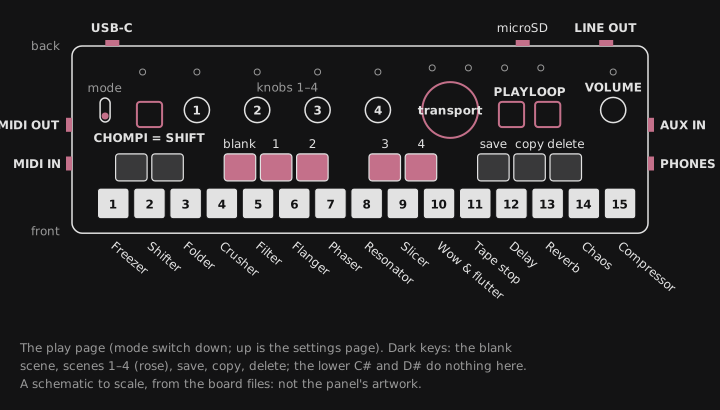
On the play page (the mode switch down), the controls are:
| Control | In FRIZZ |
|---|---|
| White keys 1-13 | The punch-in effects, in the order the sound goes through them: Freezer, Shifter, Folder, Crusher, Filter, Flanger, Phaser, Resonator, Slicer, Wow & flutter, Tape stop, Delay, Reverb |
| White key 14 | The Chaos key |
| White key 15 | The Master compressor on knobs 1-4 |
| Lower C# and D# | Nothing, kept free |
| Lower F#, G#, A#, upper C#, D# | The FX scenes: the blank scene, then scenes 1-4 |
| Upper F#, G#, A# | Save, copy and delete a scene |
| Knobs 1-4 | The effect picked last, or the compressor; a press turns them to its page 2 |
| The transport knob, the big purple one | The loop’s speed and direction, a scrub while it’s paused (Transport knob); with a scene morph held, the crossfader and the drop |
| VOLUME | Output gain, input gain and the headphone feed; with SHIFT, the input/loop mix (VOLUME knob) |
| CHOMPI | SHIFT; it confirms a save, copy or delete |
| PLAY, LOOP | The Looper; SHIFT + LOOP taps the tempo |
| The mode switch | Down the play page, up the settings page |
| AUX in | The stereo input; with no cable in it, the built-in microphone is the input (Input: AUX or the mic) |
| The outputs | The master out and the headphones |
| MIDI in and out (TRS), USB | MIDI, the clock and FRIZZ’s remote control |
| The SD card | Scenes, settings and bug reports (Card and files) |
On the settings page, the keys and knob 1 set other things: see Settings page.