Input: AUX or the mic
With a cable in AUX, you hear AUX through the effects. With no cable, the input is CHOMPI’s built-in microphone, as on TAPE and TEMPO: the looper can record it, but it stays off the outputs, so a loudspeaker near CHOMPI can’t feed it back. Three keys on the settings page change this, left to right the source, whether you hear it, then how: the upper F# picks the source, the upper G# switches its monitoring, on the outputs or not, and the upper A# sends it through the effects or past them.
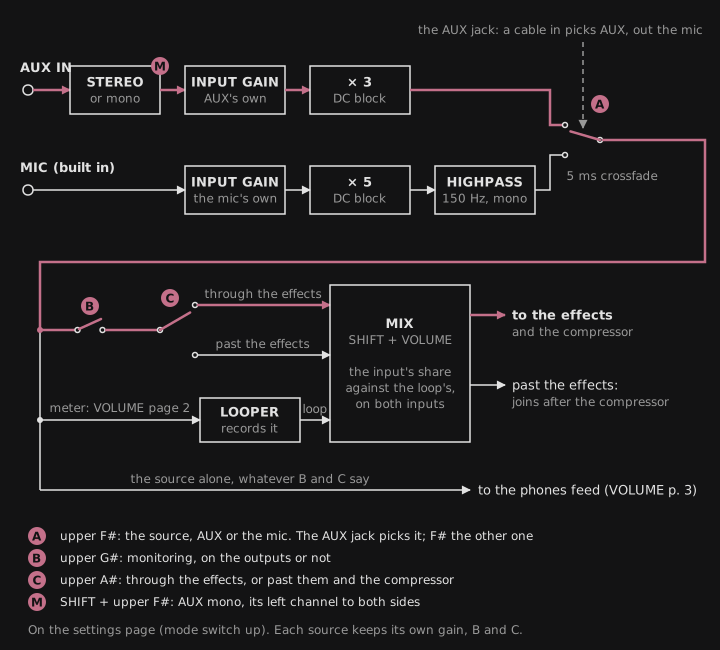
- Upper F#, the source: AUX or the mic. AUX’s jack picks: with a cable plugged in, it’s AUX; pull it out and it’s the mic; plug one in and it’s AUX again. At power-on the jack decides the same way. The upper F# picks the other by hand, until a cable next goes in or out of AUX. A jack change while recording just switches. The source isn’t saved.
- Upper G#, monitoring: the source on the outputs or not, lit when it is, as monitoring in a DAW: the looper records the source either way. Unmonitored, you can still record it and hear it alone on the headphones’ feed, without it on the master.
- Upper A#, the effects: through them, through the input/loop mix, the effects and the master compressor; or past them, past the effects and the compressor, at the input/loop mix’s input share, straight to VOLUME and the safety limiter. Lit green for through, white for past; dark while the source isn’t monitored, when it doesn’t matter (pressed then, it blinks red 3 times and changes nothing; its setting is kept for when it’s monitored again).
The upper G# and A# are each source’s own: they show and set the source heard now, and switching the source (the upper F# or the jack) brings up the other’s. Both sources’ are saved. Out of the box AUX is monitored through the effects, and the mic is through the effects but not monitored.
The looper always records the source as it is, whatever the upper G# and A# say; the loop always goes through the effects. The input/loop mix (SHIFT + VOLUME) moves by itself for either source: to the loop alone when a recording finishes and back to the input alone when the loop is erased, so a loop isn’t heard twice; with the source not monitored, its input share is silent. The headphone feed (VOLUME’s page 3) too: turned left, the input alone.
What you hear, by the input/loop mix’s position (SHIFT + VOLUME), as a reference. The headphones carry the same as the line out with the feed at the master, the input alone with it turned left, a blend between:
| Upper F# source | Upper G# monitoring | Upper A# effects | Line, mix at “input” (no loop, or after an erase) | Line, mix in the middle | Line, mix at “loop” (after a recording) | Headphones, feed left |
|---|---|---|---|---|---|---|
| AUX | on | through | AUX through the effects + compressor | AUX and the loop together through the effects + compressor | the loop through the effects + compressor | AUX pure |
| AUX | on | past | AUX pure (VOLUME and the limiter only) | AUX pure + the loop through the effects | the loop through the effects | AUX pure |
| AUX | off | – | silence (delay/reverb tails at most) | the loop alone through the effects, at its share | the loop through the effects | AUX pure |
| mic | on ⚠ | through | the mic through the effects + compressor | the mic and the loop together through the effects | the loop through the effects | mic pure |
| mic | on ⚠ | past | the mic pure | the mic pure + the loop through the effects | the loop through the effects | mic pure |
| mic | off | – | silence | the loop alone through the effects, at its share | the loop through the effects | mic pure |
- In the column heads, “mix” is the input/loop mix.
- “–”: the upper A# doesn’t matter while the source isn’t monitored (its key dark, its value kept).
- The looper records the source as it is in every row.
⚠ Monitoring the mic feeds back through a loudspeaker near CHOMPI, through the effects more so (a delay or a reverb repeats it). Switch its monitoring on with headphones, or with the speakers well away and down. Mind the headphones’ volume too: turned up near CHOMPI, they can feed back into the mic as well.
AUX past the effects is for a source that should stay as it is while you play the loop through the effects: a drum machine, a mastered song. Record it, and the input/loop mix goes to the loop alone as always; turn it to the middle to play an existing loop through the effects next to the device. AUX unmonitored records AUX without hearing it on the master (on the headphones’ feed, turned left, you still do).
The mic is mono, the same on both sides. It also hears CHOMPI’s own keys and knobs: with the mic monitored through the effects, a delay or a reverb rings out their clicks. For clean takes use AUX; with the mic, record the loop first, then switch its monitoring off before you play the effects over it. FRIZZ treats it as TAPE does: 5× the input gain (AUX gets 3×), its DC taken out, and a highpass at about 150 Hz. VOLUME’s page 2 sets the input gain of the source heard: the mic’s is its own, kept apart from AUX’s and saved. A switch of the source, of the upper G# or of the upper A# fades over 5 ms, so it doesn’t click; the source going out fades out of the outputs while the one coming in fades in, so a source that isn’t monitored is never heard, not even during a switch.
Over MIDI, CC 84 picks the source, CC 116 sets its effects and CC 117 its monitoring (see Controllers), without saving them.
Mono input
Section titled “Mono input”Mono is for a mono (TS) cable, such as one from a Lyra-8 or a guitar pedal: the plug grounds the right channel, so in stereo the source is heard on the left only. In mono the left channel feeds both sides, and the effects’ stereo knobs spread it from there. On the settings page, SHIFT + upper F# toggles it; while you hold SHIFT, the upper F# shows it (lit when mono). It’s for AUX only: the mic is mono anyway, and plays on both sides either way.